MS Access is a commonly used DBMS, known for its user-friendly interface. Like any other software, it is not immune to errors & problems. One such error message that users often encounter is- “Microsoft Access has detected corruption in this file.“
Fix Access Errors
Troubleshooting Access Database Engine Cannot Find the Input Table or Query (Error 3078)

Several users are experiencing “the Microsoft Access database engine cannot find the input table or query” error message when trying to access a specific table or query that is missing from the database. It also appears when attempting to update the Access version. However, the error is quite annoying and it should be addressed ASAP.
5 Hacks You Can’t Miss to Fix Access “ID Is Not an Index in This Table” Error
Microsoft Access users often encounter errors or issues when executing certain tasks. One of the most common errors is- “id is not an index in this table.” which occurs when trying to open a specific Access database that is corrupted. This peculiar error message is really annoying and can leave you wondering how to fix it.
SQL Server Does Not Exist or Access Denied- 9 Troubleshooting Methods
The error message “dbnetlib connectionopen (connect()). SQL server does not exist or access denied” occurs when trying to connect to the Microsoft SQL Server. It stipulates that the SQL Server database you are attempting to access cannot be found or prevent the connection. However, it is really challenging to identify the exact cause behind the error.
Fixed- Access Error “The Changes You Requested to The Table Were Not Successful (3022)”!

Microsoft Access errors often restrict or prevent users from accessing desired resources or executing intended actions. They’re notorious for interrupting tasks and triggering inconvenience to users. One such warning message that often leaves users perplexed is ” The changes you requested to the table were not successful…” Therefore, in this blog, I am going to talk about MS Access error 3022 in detail along with the reasons triggering it & providing working solutions to fix it.
How to Fix Microsoft Access Database Engine Does Not Recognize (Error 3344)?
Experiencing “the Microsoft Access database engine does not recognize as a valid field name or expression (Error 3344)” while updating the fields in Access is a frustrating obstacle. This error message also triggers while using the Crosstab Query or when Access unable to recognize fields stated in a query. In this blog, I will discuss the common causes and a few workable ways to fix the Microsoft Access database error 3344.
7 Ways- Fix “The Database Engine Could Not Lock Table Because It Is Already in Use” Error (3211)!

Stuck with the Access error 3211 ‘the database engine could not lock table because it is already in use by another person or process’ while working on the database table? If yes, don’t worry, you are at the right place. This blog outlines the possible causes along with the quick fixes to solve Access database error 3211 in no time.
5 Foolproof Solutions for MS Access Write Conflict Error!

While working on the Microsoft Access database, it is common to encounter various unexpected errors that are inevitable. One such warning message that often perplexes users is the “Write Conflict: This record has been changed.” This error typically appears when two or more users try to edit the same database record concurrently. It is quite annoying to experience an MS Access write conflict error and it should be addressed ASAP.
7 Proven Fixes for “The Database Needs to Be Repaired or Isn’t a Database File” Error
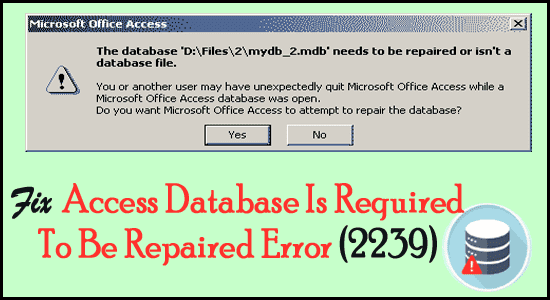
Are you encountering a peculiar error message “The database needs to be repaired or isn’t a database file”? If so, you are not alone! I have got the effective workarounds that you can apply to fix this error & get your database running smoothly again. I’ll mention all those fixes in this guide. Also, I will discuss other crucial information regarding this error and most importantly you will get the best Access Repair Tool to fix database corruption issues
Fixing Access “You Do Not Have the Necessary Permissions to Use the Object” (Error 3033)

In the world of database management, the concept of accessing objects like tables, queries, reports, forms, etc. permissions play a vital role in safeguarding the security & integrity of data. However sometimes, while trying to access such objects, you may receive an error message “You do not have the necessary permissions to use the object (error 3033).” Here’s the complete error: